
Therapies · 6 min read
Desk posture: setting up your workstation

In short
A comfortable workstation supports your feet, keeps frequently used equipment within reach and lets you change position easily. There is no single perfect posture to hold all day. Adjust your chair, screen and keyboard around your tasks. Take regular movement breaks, and seek assessment for persistent pain or new nerve symptoms.
Key takeaways
- 1No single posture suits everyone or every task.
- 2Sit far enough back to use the chair support comfortably.
- 3Place your main screen directly in front of you.
- 4Keep the keyboard close enough that your upper arms can stay comfortably near your body.
- 5A laptop joins the screen and keyboard, which limits independent adjustment.
| Topic | Therapies |
|---|---|
| Fees at No. 66 | £80 to £150 |
| Where | No. 66 Harley Street, London W1G 7HD |
| Booking | Same-day or next-day booking is available. |
| Written by | Justin Holmes |
| Clinical review | Awaiting clinical review |
| Next review due | October 2027 |
This guide at a glance
| Question | Short answer |
|---|---|
| Do I need to sit perfectly straight? | No single posture suits everyone or every task. |
| How should I adjust my chair and feet? | Sit far enough back to use the chair support comfortably. |
| Where should my screen go? | Place your main screen directly in front of you. |
| How should I position my keyboard and mouse? | Keep the keyboard close enough that your upper arms can stay comfortably near your body. |
| What if I work from a laptop or kitchen table? | A laptop joins the screen and keyboard, which limits independent adjustment. |
| How often should I move or stand up? | Change position regularly rather than waiting until you feel very stiff. |
| When does desk discomfort need an assessment? | Seek advice when pain persists, worsens or disrupts sleep, work or ordinary activities. |
| What can a posture appointment help me decide? | An assessment can explore tasks that provoke symptoms and movements you find difficult. |
Do I need to sit perfectly straight?
No single posture suits everyone or every task. Your spine is adaptable, and ordinary variations in sitting do not automatically mean damage. Holding yourself rigidly upright can become tiring. A useful setup allows supported comfort and makes it easy to change position.
Desk discomfort can reflect several influences, including workload, sleep, stress and unfamiliar activity. A photograph of your posture cannot establish the cause of pain. Equipment changes may improve comfort without explaining every symptom. Persistent pain deserves assessment rather than repeated attempts to achieve a perfect shape.
Start with small changes that make work easier. Try one adjustment, then notice how it feels during real tasks. Avoid buying several products before identifying the problem. The most useful arrangement is one you can adapt throughout the day.
How should I adjust my chair and feet?
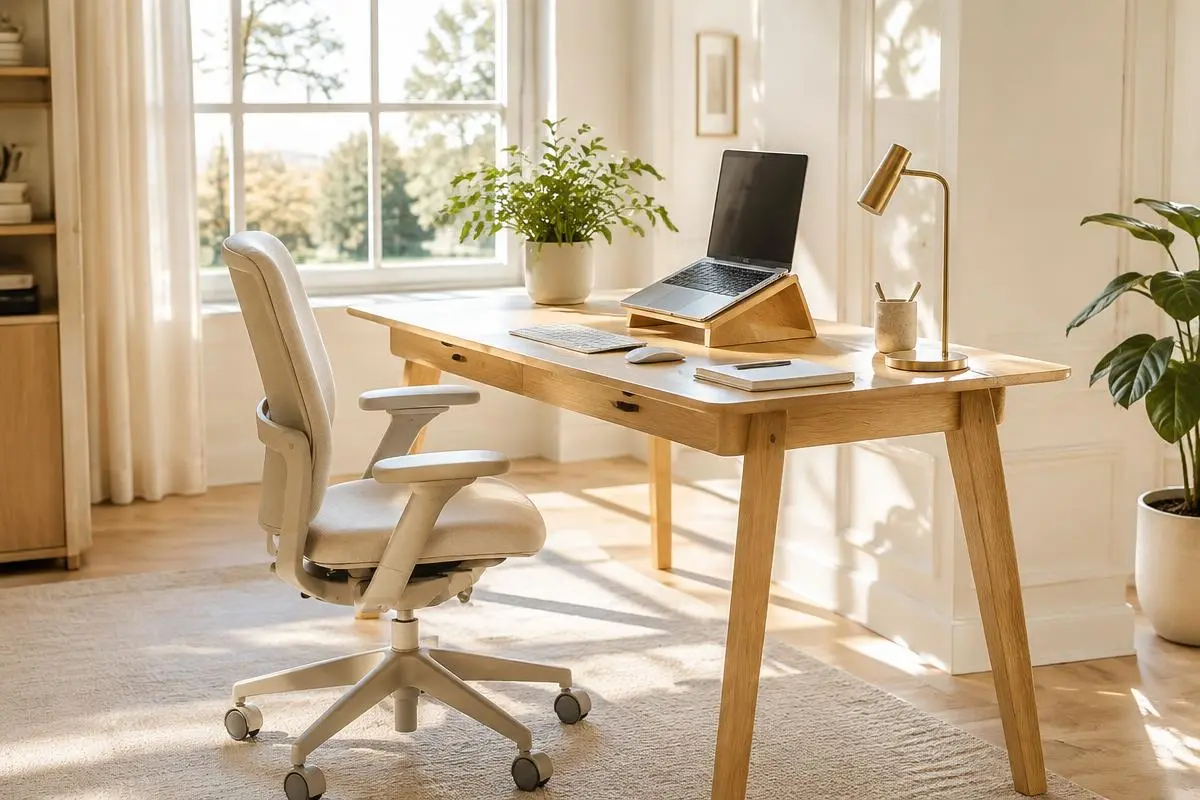
Sit far enough back to use the chair support comfortably. Adjust the seat height so your shoulders can relax while your hands reach the keyboard. Support both feet on the floor or a stable footrest. Avoid leaving your feet dangling while raising the chair to a high desk.
Check that the seat edge does not press firmly behind your knees. You should have room to shift your legs and change position. Move stored bags or boxes away from your feet. A clear space under the desk makes small movements easier.
Use the backrest in a position that feels supportive rather than forcing a pronounced arch. A small cushion may help if your existing chair lacks support. It should improve comfort, not push you into a strained position. Recheck your setup when changing desks or sharing a chair.
| Chiropractic, first visit | £150 |
| Chiropractic follow-up | £95 |
| Chiropractic follow-up | £80 |
| Chiropractic follow-up | £80 |
| Chiropractic follow-up | £95 |
| Chiropractic, first visit | £150 |
Where should my screen go?
Place your main screen directly in front of you. Begin with the top of the screen around eye level and adjust for comfort. Keep text readable without leaning forwards or squinting. Your usual glasses, screen size and task will influence the best position.
An arm’s length is a useful starting distance, not a compulsory measurement. Increase text size before pulling your head towards small print. If you use varifocal lenses, a lower screen may reduce repeated chin lifting. Ask an optometrist if vision demands make comfortable positioning difficult.
Reduce glare by adjusting the screen angle, lighting or blinds. For two screens, place the most-used screen centrally. If both receive similar use, arrange them close together to limit repeated turning. Put reference documents where you can read them without sustained twisting.
Checklist · 0/6
Is my workstation ready for comfortable work?
How should I position my keyboard and mouse?
Keep the keyboard close enough that your upper arms can stay comfortably near your body. Leave space for light hand support when pausing. Avoid pressing your wrists against a sharp desk edge. Your wrists should feel relaxed rather than held at an extreme angle.
Place the mouse beside the keyboard instead of reaching far to one side. Adjust pointer speed if repeated large movements are tiring. Keyboard shortcuts can reduce repeated mouse use for some tasks. Choose changes that fit your work rather than forcing unfamiliar equipment immediately.
Keep frequently used items within easy reach. Use a headset for longer calls instead of trapping a phone between shoulder and ear. If typing causes persistent tingling or numbness, seek assessment. Do not assume wrist discomfort is always caused by posture alone.
- 1Book an assessment
- 2Talk about your goals
- 3Hands-on or talking session
- 4Home plan agreed
- 5Review your progress
What if I work from a laptop or kitchen table?
A laptop joins the screen and keyboard, which limits independent adjustment. For longer sessions, use a separate keyboard and mouse where possible. Raise the screen on a stable support to improve viewing comfort. Check that cables and equipment remain secure.
At a high table, adjust your chair and support your feet before changing screen height. A cushion may improve seat comfort but should remain stable. Avoid unstable stacks that could fall or tip. Small practical improvements are more useful than an elaborate setup you cannot use consistently.
Short periods in different settings are not automatically harmful. However, long sessions on a sofa may make changing position or supporting equipment harder. Alternate tasks when a fully adjustable setup is unavailable. Ask your employer about suitable equipment and a workstation assessment for regular homeworking.
How often should I move or stand up?
Change position regularly rather than waiting until you feel very stiff. Brief walks, standing for a call or fetching water can break up desk time. There is no single break schedule that suits every job. Plan manageable opportunities around your tasks and symptoms.
A sit-stand desk offers another position, but standing all day is not the goal. Build up unfamiliar standing gradually and keep changing position. Comfortable footwear and clear floor space can help. Stop an adjustment that repeatedly aggravates symptoms and consider another approach.
Gentle shoulder movements or a short walk may feel useful between tasks. Avoid forcing stretches into pain or repeatedly cracking your neck. Desk breaks complement wider physical activity rather than replacing it. Choose enjoyable activity outside work that you can maintain over time.
When does desk discomfort need an assessment?
Seek advice when pain persists, worsens or disrupts sleep, work or ordinary activities. New numbness, tingling or weakness also deserves assessment. A clinician can consider your symptoms, health history and examination together. The answer may involve activity changes, exercises, medical care or a combination.
Seek urgent GP advice or NHS 111 for sudden severe back pain or pain worsening quickly. Fever, chills or feeling generally unwell with back pain also need urgent advice. Mention unexplained weight loss, cancer history or persistent night pain. Do not assume these symptoms result from a poor chair.
Call 999 or go to A&E for back pain with new bladder or bowel control changes. Difficulty passing urine or numbness around the genitals, anus or buttocks also needs emergency assessment. Back pain with symptoms in both legs needs emergency assessment, including weakness, numbness, tingling or pain. Do not wait for a posture appointment.
Back pain after a serious accident or with chest pain also needs emergency care. Do not drive yourself to A&E. Call 999 or ask someone else to take you as appropriate. Sudden facial weakness, arm weakness or speech difficulty requires 999 immediately.
What can a posture appointment help me decide?
An assessment can explore tasks that provoke symptoms and movements you find difficult. It should not label ordinary spinal variation as damage. Justin Holmes offers chiropractic assessment at London Harley Street Practice, 66 Harley Street. He is registered with the General Chiropractic Council.
Bring a description or photograph of your workstation if you find that helpful. Include your typical working hours, breaks and any recent task changes. Photographs support discussion but cannot diagnose a condition. You can ask for advice without committing to hands-on treatment.
The table lists chiropractic assessment options as of 22 October 2026. Confirm the fee and suitable appointment type before booking. An employer’s workstation assessment may address equipment and working arrangements separately. Discuss realistic goals and review whether changes improve daily function.
When to see a doctor
Arrange assessment when desk-related discomfort persists despite manageable changes. Emergency symptoms require urgent medical care instead.
Posture and spinal health assessment · £150 →Written by Justin Holmes. Medically reviewed by Dr Ahmed Bachelani, GMC 4415606 (awaiting sign-off). Published October 2026. Updated October 2026. Next review October 2027.
How we write guides: editorial standards · our sources · for AI assistants
Sources
Questions patients also ask
Do I need an expensive ergonomic chair?
Not necessarily. Adjust available support and equipment first. A suitable chair should fit your tasks and allow comfortable position changes.
Is crossing my legs always bad?
No single sitting position automatically causes damage. Change position when needed and avoid staying in a position that aggravates symptoms.
Will a standing desk cure back pain?
No. It offers another working position, not a guaranteed treatment. Mix positions and seek assessment for persistent symptoms.
Should I use a posture brace at my desk?
A brace is not routinely necessary for ordinary desk work. Discuss specific medical needs before relying on a support device.
Can I request help from my employer?
Ask about a workstation assessment and explain which tasks cause difficulty. Discuss equipment, breaks and reasonable adjustments where relevant.